Hero Image

Made by Auditors for Auditors

Metricview is a digital audit platform that automates routine tasks, applies AI where it adds value, and structures the audit from start to finish — with 100+ ready-to-use audit procedures, consistent documentation, and more time for professional judgment.

Get Started

Benefits

Discover how Metricview ensures accuracy, streamlines audits, and gives you more time for professional judgment.

Spend less time

Spend less time per audit

Automated data import, reconciliations, and workpaper preparation free auditors from repetitive manual work. Working papers are generated in a consistent, professional format across the team.

Guided workflow

A clear, guided workflow

Metricview mirrors the natural stages of an audit: Planning, Interim, and Year-end. Each stage is structured into chapters with standard procedures, balance checks, and clear status tracking.

Technology built for auditors

Technology built for auditors

Metricview uses AI-assisted analysis and automation to support consistent and transparent audit workflows. Accounting data and source documents are linked to aid review, and information is processed using established security and access controls.

Missing a procedure?

Send us a request with a clear description, and we'll work to implement it where possible.

Send Request

About

Metricview was created by the same team that earlier developed one of the first widely adopted digital audit tools in Norway. That experience, combined with the rise of more advanced AI technologies, led to a more ambitious goal: a platform that supports the entire audit process.

  • Made by auditors - grounded in real audit practice.
  • Community-powered - developed together with users, with new features added continuously.
  • Cutting-edge technology - AI and automation applied responsibly, giving auditors stronger tools without replacing professional judgment.
About Metricview

Metricview is continuously evolving. We are committed to delivering ongoing enhancements, deeper integrations, and advanced analytics to help audit and accounting professionals work smarter, faster, and with greater assurance.

Demo

Experience the power of Metricview through our demo video.

Metricview is continuously evolving — see the latest product updates.

Metricview uses AI-assisted features to support analysis and automation. Core accounting data is processed within Metricview platform, with selected document processing supported by third-party services. Contact us to learn more.

Features

Metricview structures and automates audit work throughout the entire audit cycle — from planning and interim to year-end. Data is pulled directly from the client's accounting system, SAF-T files, and public registries, so auditors can focus on professional judgment rather than manual data collection.

100+

A Powerful Toolset — More Than 100 Built-in Audit Procedures

Over 100 ready-to-use, professionally grounded audit procedures — across general and specific audit areas, structured for planning, interim, and year-end. Each procedure delivers exactly what auditors need — directly, without detours.

A selection of what is ready from day one:

  • Advanced and flexible Monetary Unit Sampling (MUS) — across audit areas and account numbers
  • Trial balance, balance sheet, and income statement from client accounting data
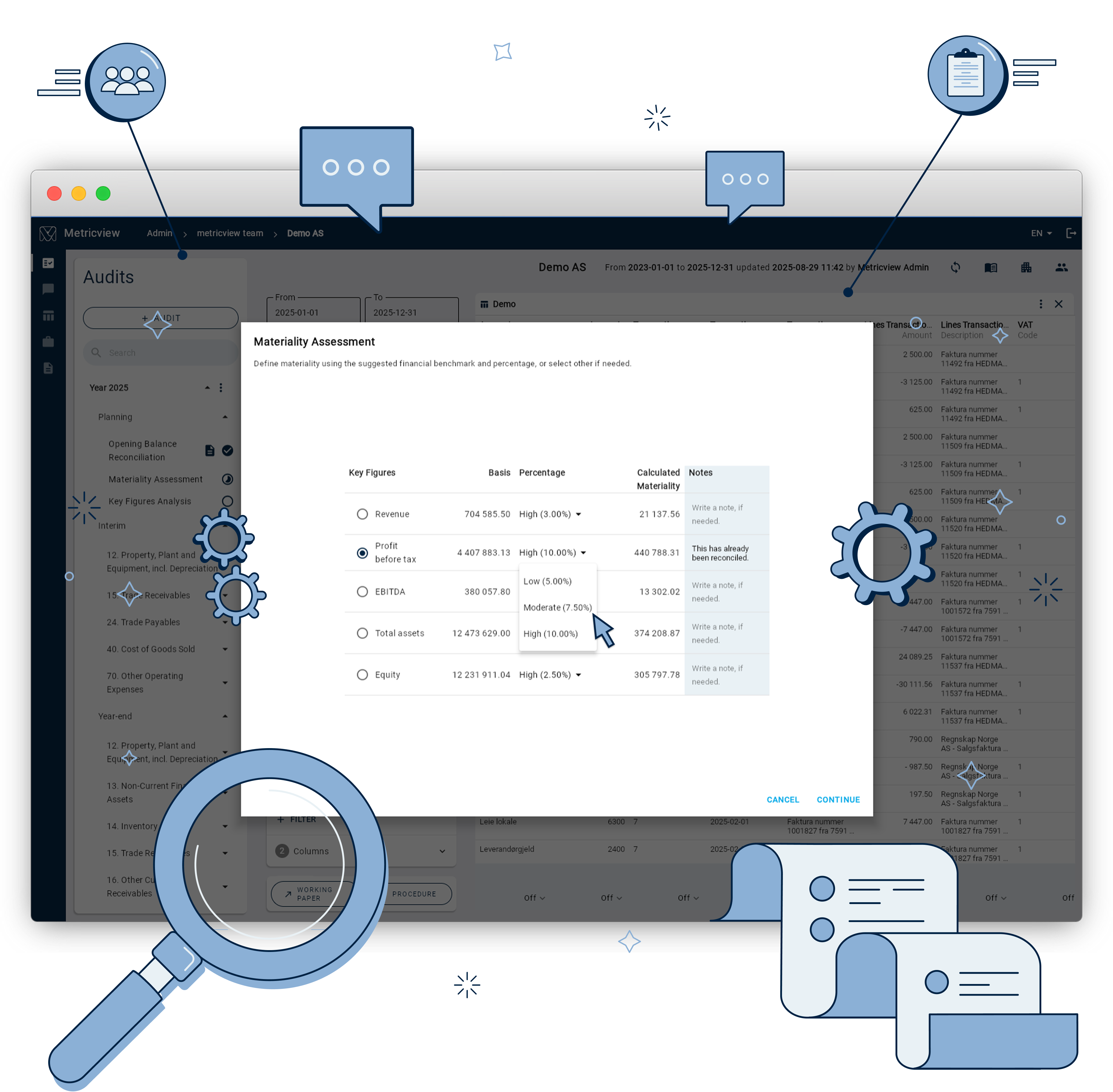
  • Materiality assessment with key figures
  • Preliminary analysis and going concern assessment
  • Reconciliation of opening balance to official financial statement figures

  • Customer and supplier balance lists with automatic Brreg checks (bankruptcy, dissolution, VAT registration)
  • Open items for customers and suppliers
  • Aged receivables
  • Credit note review for customers and suppliers
  • Supplier invoice approval — segregation of duties and timely processing
  • Reconciliation of sub-ledger to general ledger
  • Top 10 customers and suppliers
  • Customers with credit balances and suppliers with debit balances
  • Discrepancies between supplier invoice date and posting period
  • Tax deductibility for written-off receivables

  • Reconciliation of asset register to general ledger
  • Review of additions, disposals, and gains/losses on fixed assets
  • Review and reconciliation of depreciation
  • Test of capitalization requirements for other operating costs
  • Reconciliation of short-term financial investments to market value, ownership, and external documentation
  • Review of gain/loss calculations and recorded dividends
  • External documentation and ownership of financial non-current assets

  • Postings without corresponding sub-ledger entry (revenue, cost of goods sold, operating costs)
  • Project margin analysis
  • Missing project and department references
  • Monthly account movements

  • VAT overview by period with tax base and calculated VAT per code
  • Review of timely VAT payment (account 2740)
  • Review of timely employer's social security contribution payment (account 2770)

  • Review of cash and bank deposits
  • Review of short-term loans and other long-term debt
  • Review of provisions for liabilities
  • Reconciliation of VAT receivables and accrued public grants
  • Review of basis for accrual of prepaid costs

For each procedure, transactions are displayed with associated VAT codes, customers, suppliers, projects, departments, and employees — ready for review and documentation. The procedure library is continuously expanded based on input from Norwegian auditors.

Easy to Adopt, Efficient in Use

Designed for a fast, structured, and confident introduction to new tooling — with a focus on a more efficient and modern audit process.

An intuitive and well-crafted interface, combined with a natural and consistent workflow, means auditors become productive quickly and can focus on their craft rather than the system.

Direct Data Integration

Metricview connects directly to the client's accounting system and retrieves transaction data, sub-ledgers, invoice status, and approval history automatically.

Auditors can see who posted, approved, and recorded each supplier invoice — and when — directly within the relevant audit procedure.

Automatic Public Registry Checks

Customers and suppliers are continuously verified against the Brønnøysund Register, with status shown directly in the balance list.

Status — bankruptcy, dissolution, missing VAT registration — is shown directly in the balance list. The opening balance is automatically reconciled against the most recently approved annual report from Proff, so discrepancies from official data are caught without manual lookups.

Advanced Data Analysis

Full flexibility to explore client accounting data with filters, column selection, groupings, and saved layouts.

Transactions can be broken down by VAT code, customer, supplier, project, department, and employee. Layouts can be saved and reused across clients and periods.

AI-Driven Analysis

Create AI chats and run custom prompts directly against client accounting data to investigate transactions and uncover patterns.

A flexible analysis tool that lets auditors explore data on their own terms — investigating transactions, uncovering patterns, or getting a quick overview of any audit area.

Custom Audit Procedures

Build your own audit procedures based on data analyses and AI queries, and reuse them across clients and periods.

Standardize the firm's own methodology and adapt procedures to industry-specific needs — without leaving the platform.

Transaction Attachments

All source documents are linked directly to their underlying transactions — navigate from a transaction to the original document in one click.

Attachments are available without contacting the client or searching through folders — everything is collected and structured by period and chart of accounts, enabling an efficient and traceable review of the documentation basis.

Source Document Review (OCR)

Supplier invoices in PDF and image format are automatically scanned with OCR, extracting over 40 key data points — amounts, dates, supplier, invoice number, and more.

Extracted data is compared against what has been posted in the accounting system, so discrepancies between original documentation and entries are surfaced automatically.

Audit Management & Engagement Overview

Engagements organized by client and audit period, with full visibility into progress, completed procedures, and remaining work.

The audit team can see the status of each individual procedure, and work can be assigned and followed up across team members.

Team & Collaboration

Multiple auditors can work in parallel on the same engagement, with full traceability of who did what and when.

Comments, notes, and conclusions are documented directly on individual audit procedures and form part of the audit documentation.

Client & Company Administration

All client information in one central overview, with multiple financial years, organizations, and engagements per client.

History is preserved across periods, so year-over-year comparison is available directly within audit procedures.

Reporting & Audit Documentation

Completed procedures exported as structured PDF and Excel reports, with annotations and full user traceability.

Auditors can annotate, comment, and mark procedures as completed directly in the platform, with full traceability of user and timestamp.

Data Export

All datasets and analysis results can be exported to Excel and CSV, preserving filters, columns, and groupings.

Exports preserve filters, column selection, and groupings, so work can continue outside the platform without loss of context.

Secure Access & Administration

Role-based access control, encryption of sensitive data, and secure authentication tailored to audit firm requirements.

Administrators manage users, roles, and access at the firm level, with a full audit log of changes.

Integrations

Metricview is built to fit the Norwegian audit environment and connects directly to the systems auditors already use:

Tripletex
Tripletexaccounting data, open items, aging, credit notes, and approval information
PowerOffice Go
PowerOffice Goaccounting data with asynchronous import for larger clients
SAF-T
SAF-Timport of accounting data in Standard Audit File format
Skatteetaten
Skatteetatenverification and reconciliation against official tax authority data
Brønnøysundregistrene
Brønnøysundregistrene (Brreg)company status, bankruptcy, dissolution, and VAT registration
Proff
Proffofficial annual reports for opening balance reconciliation

New integrations are continuously developed based on requests from the audit community.

Built Together with Norway's Audit Community

Metricview is developed in close collaboration with practicing state-authorized auditors. Methodology, audit procedures, and integrations are continuously refined based on user feedback. The platform builds on recognized audit methodology and is designed in accordance with applicable standards and Norwegian practice.

Want to see Metricview in action? Get in touch for a demo.

Pricing

To ensure accurate pricing and proper onboarding, we ask that you first submit the form below. Once submitted, you will immediately gain access to our pricing details.

Pricing

All prices are excluding VAT and billed quarterly based on actual usage.

Company
Volume Price Billing
Up to 100,000 transaction lines (cumulative) NOK 200 / month Per company
Over 100,000 transaction lines (cumulative) NOK 400 / month Per company
Usage Add-ons
Service Price Billing
Source Documents processing NOK 100 / 1,000 documents Based on actual usage
Employee Roles Lookups NOK 100 / 10 lookups Based on actual usage

Usage-based charges are calculated from actual activity during the billing period and invoiced quarterly. Company pricing tier is determined by the total cumulative transaction line count in Metricview.

Contacts

Reach out to Metricview team for sales or support.

Sales

For sales inquiries, please contact us at:

sales@metricview.io

Support

For technical support or assistance, reach out to:

support@metricview.io

Phone

You can also reach us directly by phone during business hours (Monday to Friday, 09:00 - 15:00 CET):

(+47) 242 00 001

Help Center

Find answers to common questions, step-by-step guides, and helpful resources in our Help Center.

Visit Help Center